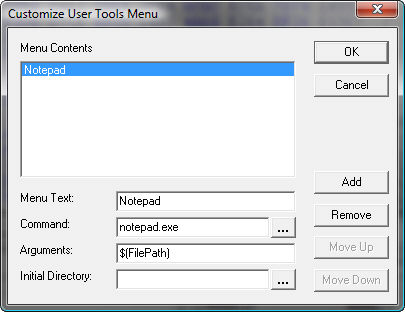
User Tools
Users Tools allow you to add custom applications and tools to the Hex Workshop environment. Custom applications are added to the end of the Tools Menu and are managed by select "Customize..." from the Tools Menu.
Additionally, Hex Workshop allows you to add context sensitive variables in the "Arguments" setting of customize dialog. These variables pull information from the active document in focus. If no document is in focus or a setting is not applicable then a space is substitute for the variable. An overview of the variables are listed below:
|
$(FilePath) |
Fully qualified path to active document |
|
$(FileDrive) |
Drive of the active document |
|
$(FileDir) |
Directory of the active document |
|
$(FileName) |
Filename of the active document |
|
$(FileExt) |
File extension of the active document |
|
|
|
|
$(DosFilePath) |
Fully qualified DOS (8.3) path to active document |
|
|
|
|
$(CurrOffsetDec) |
Current address or offset in decimal |
|
$(CurrOffsetHex) |
Current address of offset in hexadecimal |
|
$(CurrSelectionDec) |
Current selection length in decimal |
|
$(CurrSelectionHex) |
Current selection length in hexadecimal |