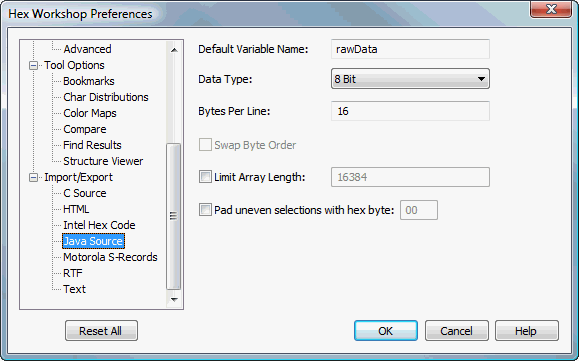
Java Source Import/Export Preferences
Hex Workshop Preferences Dialog is launched by either selecting "Preferences..." from the "Options" menu or by pressing the Preferences icon on the File Operations Toolbar.
Preferences are organized under 4 major categories: Display Options, Configuration, Tool Options, and Import/Export followed by sub-categories.
The "Reset All" button resets all preferences to default settings. The "Help" button displays help for selected preference sub-category.
Defines the variable name used in the C Source or Java Source export of the users data.
Specified the data type used for a C Source or Java Source export. Choices include 8 bit, 16 bit, 32 bit, and 64 bit data types.
Defines the number of data bytes to include on each line of C Source or Java source export array definition.
Allows users to swap the byte order (e.g. big endian vs little endian) of their data when exporting to C Source or Java Source arrays. The default is disabled.
Allows users to set the maximum array size for C or Java source export. If a user tries to export data larger then the maximum size defined, Hex Workshop will output multiple chunks of data into separate arrays. This feature was added to address the a maximum array size limitation in some compilers. By default, this is disabled.
Defines the handling of uneven file sizes or selections when exporting as C and Java source. If the selection or file size is not an even multiple of the data type, Hex Workshop can either:
Truncate the data by unchecking this parameter
Pad the data with the specified hex byte by checking this parameter
The default is unchecked (or truncate data).